
Scalability
When handling large amounts of readers or publishers, streaming performance might get degraded due to bottlenecks in the underlying hardware infrastructure. In case of streaming without re-encoding (which is what MediaMTX does), these bottlenecks are almost always related to the limited bandwidth between server and readers. This issue can be strongly mitigated by implementing horizontal scalability, which means deploying multiple coordinated server instances, and evenly distributing load on them.
There are several methods available to implement horizontal scalability, the main ones are described in this page.
Read replicas
The main technique for handling additional readers consists in instantiating additional MediaMTX instances, called read replicas, that are in charge of picking streams from a MediaMTX “origin” instance and serving them to users. User connections and requests are distributed to each replica by a load balancer.
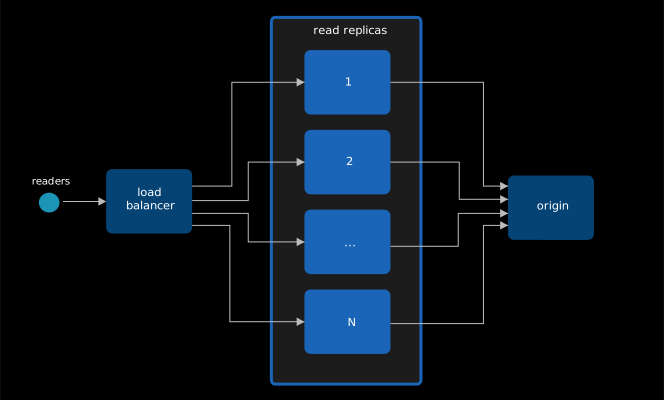
Publishers are meant to publish to the origin instance.
Read replicas must be configured in this way:
- Add one or more proxy paths, pointing to the MediaMTX origin instance, as described in Proxy.
- If the protocol used by readers is WebRTC, disable
webrtcLocalUDPAddressandwebrtcLocalTCPAddressand enable a STUN server, as described in Solving WebRTC connectivity issues.
The load balancer has to behave differently depending on the protocol(s) readers are gonna use to read the stream:
- When using RTSP, RTMP, SRT, the load balancer must be a Layer 4 LB.
- When using HLS and WebRTC, the load balancer must be a Layer 7 LB with sticky sessions enabled. Sticky sessions are needed to forward HTTP requests from the same user to the same replica, since a single HLS or WebRTC session is composed of several HTTP requests.
Generic implementation
On the machine meant to host the MediaMTX origin instance, launch the instance:
docker run -d \
--name mediamtx \
--restart always \
--network host \
bluenviron/mediamtx:1
On machines meant to host read replicas, create this MediaMTX configuration (
mediamtx.yml):webrtcLocalUDPAddress: webrtcICEServers2: - url: stun:stun.l.google.com:19302 paths: "~^(.+)$": source: rtsp://dns-of-origin:8554/$G1 sourceOnDemand: yesReplace
dns-of-originwith the DNS or IP of the origin machine.Then launch MediaMTX:
docker run -d \
--name mediamtx \
--restart always \
--network host \
-v $PWD/mediamtx.yml:/mediamtx.yml \
bluenviron/mediamtx:1
On machines meant to host the load balancer, create this Traefik configuration (
traefik.yml):entryPoints: rtsp: address: ":8554" rtmp: address: ":1935" srt: address: ":8890/udp" # SRT usually uses UDP hls: address: ":8888" webrtc: address: ":8889" providers: file: filename: "/etc/traefik/dynamic_conf.yml" watch: trueCreate this second, dynamic, configuration (
dynamic_conf.yml):tcp: routers: rtsp-router: rule: "HostSNI(`*`)" entryPoints: ["rtsp"] service: "rtsp-service" rtmp-router: rule: "HostSNI(`*`)" entryPoints: ["rtmp"] service: "rtmp-service" services: rtsp-service: loadBalancer: servers: - address: "replica-1-ip:8554" - address: "replica-2-ip:8554" rtmp-service: loadBalancer: servers: - address: "replica-1-ip:1935" - address: "replica-2-ip:1935" udp: routers: srt-router: entryPoints: ["srt"] service: "srt-service" services: srt-service: loadBalancer: servers: - address: "replica-1-ip:8890" - address: "replica-2-ip:8890" http: routers: hls-router: rule: "PathPrefix(`/`)" entryPoints: ["hls"] service: "hls-service" webrtc-router: rule: "PathPrefix(`/`)" entryPoints: ["webrtc"] service: "webrtc-service" services: hls-service: loadBalancer: sticky: cookie: name: "SERVERID" servers: - url: "http://replica-1-ip:8888" - url: "http://replica-2-ip:8888" webrtc-service: loadBalancer: sticky: cookie: name: "SERVERID" servers: - url: "http://replica-1-ip:8889" - url: "http://replica-2-ip:8889"Then launch Traefik:
docker run -d \
--name traefik \
--restart always \
--network host \
-v $PWD/traefik.yml:/etc/traefik/traefik.yml \
-v $PWD/dynamic_conf.yml:/etc/traefik/dynamic_conf.yml \
traefik:v3.6.14
You can now use the IP address or DNS of the load balancer machines to read streams with any protocol.
It is also possible to entirely skip the load balancer setup by creating a domain name associated with all read replica IPs, and using that to read streams, although it is up to the DNS provider to randomize the IP order and it is up to clients to pick a random one.
AWS implementation
Create a Security group called
mediamtx-load-balancer, that will be used by the load balancers. In Inbound rules, add:- a rule with type All TCP, source
0.0.0.0/0(anywhere). - a rule with type All UDP, source
0.0.0.0/0(anywhere).
- a rule with type All TCP, source
Create a Security group called
mediamtx-read-replicas, that will be used by the read replicas. In Inbound rules, add:- a rule of type SSH. In the source field, insert the IP range of administrators.
- a rule with type All TCP, source Custom, pick the
mediamtx-load-balancersecurity group. - a rule with type All UDP, source Custom, pick the
mediamtx-load-balancersecurity group.
Create a Security group called
mediamtx-origin, that will be used by the origin. In Inbound rules, add:- a rule of type SSH. In the source field, insert the IP range of administrators.
- a rule with type Custom TCP, port
8554(RTSP), source Custom, pick themediamtx-read-replicassecurity group. - a rule with type All UDP, source Custom, pick the
mediamtx-read-replicassecurity group. - a rule of type Custom TCP, port
8554(RTSP). In the source field, insert the IP range of publishers. - a rule of type All UDP. In the Source field, insert the IP range of publishers.
Launch an EC2 instance that is meant to host the MediaMTX origin instance. Pick the Amazon Linux AMI. Assign the
mediamtx-originSecurity group to the instance. In Advanced Details, in the User data textarea, copy and paste this:#!/bin/bash dnf update -y dnf install -y docker systemctl start docker systemctl enable docker usermod -aG docker ec2-user docker run -d \ --name mediamtx \ --restart always \ --network host \ bluenviron/mediamtx:1Create a Launch template for the read replicas. Pick the Amazon Linux AMI. Assign the
mediamtx-read-replicasSecurity group to the launch template. In Advanced Details, in the User data textarea, copy and paste this:#!/bin/bash dnf update -y dnf install -y docker systemctl start docker systemctl enable docker usermod -aG docker ec2-user mkdir -p /etc/mediamtx/ tee /etc/mediamtx/mediamtx.yml << EOF webrtcLocalUDPAddress: webrtcICEServers2: - url: stun:stun.l.google.com:19302 paths: "~^(.+)$": source: rtsp://dns-of-origin:8554/\$G1 sourceOnDemand: yes EOF docker run -d \ --name mediamtx \ --restart always \ --network host \ -v /etc/mediamtx/mediamtx.yml:/mediamtx.yml \ bluenviron/mediamtx:1Replace
dns-of-originwith the private DNS of the origin EC2 instance.Create several Target groups, with target type Instances, one for each of the following Protocol / Port combinations:
- Name
mediamtx-read-replicas-8554, Protocol TCP, port8554(RTSP), health check protocol TCP. - Name
mediamtx-read-replicas-1935, Protocol TCP, port1935(RTMP), health check protocol TCP. - Name
mediamtx-read-replicas-8890, Protocol UDP, port8890(SRT), health check protocol TCP, Advanced health check settings, Health check port, override, insert8554. - Name
mediamtx-read-replicas-8888, Protocol HTTP, port8888(HLS), health check protocol HTTP, Advanced health check settings, Health check success codes404. - Name
mediamtx-read-replicas-8889, Protocol HTTP, port8889(WebRTC), health check protocol HTTP, Advanced health check settings, Health check success codes404.
Do not associate these target groups with any instance for now.
- Name
Select the
mediamtx-read-replicas-8888target group, tab Attributes, Edit, section Target selection configuration, Turn on stickiness, Save. Do the same for themediamtx-read-replicas-8889target group.Create a Load Balancer, type Network Load Balancer. Assign the
mediamtx-load-balancerSecurity group to the load balancer. In Listeners, define 3 listeners:- Protocol TCP, port
8554(RTSP), forward to target groupmediamtx-read-replicas-8554 - Protocol TCP, port
1935(RTMP), forward to target groupmediamtx-read-replicas-1935 - Protocol UDP, port
8890(SRT), forward to target groupmediamtx-read-replicas-8890
- Protocol TCP, port
Create a Load Balancer, type Application Load Balancer. Assign the
mediamtx-load-balancerSecurity group to the load balancer. In Listeners, define 2 listeners:- Protocol HTTP, port
8888(HLS), forward to target groupmediamtx-read-replicas-8888 - Protocol HTTP, port
8889(WebRTC), forward to target groupmediamtx-read-replicas-8889
- Protocol HTTP, port
Create an Auto scaling group for the read replicas. Pick the launch template that was defined before. CPU and Memory parameters are usually not important. In the Load balancing section, pick Attach to an existing load balancer and select all 5 target groups that were created before. In the Group size section, in Desired capacity, set the desired instance count.
You can now use the DNS of the Network Load Balancer to read streams with RTSP, RTMP and SRT, and the DNS of the Application Load Balancer to read streams with HLS and WebRTC.
This process involved all available protocols, but it can be greatly simplified if users are meant to read streams with a single protocol only (for instance, WebRTC), in this case, opening specific ports only (8889) and creating specific load balancers only (Application load balancer) is enough.
CDN
The read replicas technique provides the lowest latency, is compatible with all protocols and can be implemented on any on-premises or cloud environment, but it comes with some limitations regarding performance and cost:
- Sudden load spikes can be handled by adjusting read replica count, but this adjustement is not immediate and depends on either an autoscaling policy or a manual action, leading to a potential temporary performance degradation.
- Increasing the read replica count can lead to saturation of the bandwidth between read replicas and the origin, creating a new bottleneck.
- Each read replica requires a dedicated and potentially expensive machine.
An alternative way to serve streams consists in putting a CDN in front of the MediaMTX HLS server, in charge of storing cacheable files and serving requests, freeing the server from the load of most user requests. This method overcomes scalability and cost limitations, but has some drawbacks:
- Only the HLS protocol is available.
- Low-Latency HLS playlists cannot be cached and are always requested from the server, therefore it is often necessary to disable the Low-Latency HLS variant, introducing significant latency.
- Standard MediaMTX authentication mechanisms are not available. Streams are always accessible by anyone, unless the CDN enforces its own authentication system.
In order to allow MediaMTX to recognize CDN requests and serve cacheable files, the CDN must insert into every request an Authorization: Bearer header with a secret, that must match the one defined in the hlsCDNSecret configuration parameter in MediaMTX.
Generic implementation
On the machine meant to host MediaMTX, create this MediaMTX configuration (
mediamtx.yml):hlsCDNSecret: XXXXXXXXXX hlsVariant: fmp4 paths: all:Replace
hlsCDNSecretwith some secret key. Using thefmp4HLS variant is strongly encouraged to prevent playlist requests from always reaching the server.Then launch MediaMTX:
docker run -d \
--name mediamtx \
--restart always \
--network host \
bluenviron/mediamtx:1
Configure the CDN to use the MediaMTX machine as origin, and to inject
hlsCDNSecretin theAuthorization: Bearerheader.
AWS implementation
Create a Security group called
mediamtx-load-balancer, that will be used by the load balancer in front of the origin. In Inbound rules, add:- a rule with type All TCP, source
0.0.0.0/0(anywhere).
- a rule with type All TCP, source
Create a Security group called
mediamtx-origin, that will be used by the EC2 instance that will host MediaMTX. In Inbound rules, add:- a rule of type SSH. In the source field, insert the IP range of administrators.
- a rule of type Custom TCP, port
8554(RTSP). In the source field, insert the IP range of publishers. - a rule of type All UDP. In the Source field, insert the IP range of publishers.
- a rule with type All TCP, source Custom, pick the
mediamtx-load-balancersecurity group.
Create an EC2 instance. Assign the
mediamtx-originSecurity group to the instance.Log into the EC2 instance. create this MediaMTX configuration (
mediamtx.yml):hlsCDNSecret: XXXXXXXXXX hlsVariant: fmp4 paths: all:Replace
hlsCDNSecretwith some secret key. Using thefmp4HLS variant is strongly encouraged to prevent playlist requests from always reaching the server.Then launch MediaMTX:
sudo dnf update -y
sudo dnf install -y docker
sudo systemctl start docker
sudo systemctl enable docker
sudo usermod -aG docker ec2-user
sudo docker run \
-d \
--restart=always \
--name mediamtx \
--network host \
-v $PWD/mediamtx.yml:/mediamtx.yml \
bluenviron/mediamtx:1
Create a Target group. In Target Type leave Instance, in Protocol leave HTTP, in Port insert
8888(HLS). Open Advanced health check settings, in Success codes insert404. Associate the Target group with the EC2 instance.Create a Load Balancer, type Application Load Balancer. Assign the
mediamtx-load-balancerSecurity group to the load balancer. In Listeners, set the HTTP port to8888(HLS) and in Target group select the target group that was created previously.Create a CloudFront distribution. Point it to the load balancer. In HTTP port, insert
8888(HLS).In the distribution page, edit the origin. Under Add custom header, click on Add header and fill:
- Header name:
Authorization - Value:
Bearer XXXXX(replace XXXX with thehlsCDNSecretvalue)
In the distribution page, edit the default behavior. In Cache policy, pick
UseOriginCacheControlHeaders.- Header name:
You can now use the URL of the CloudFront distribution to read HLS streams, for instance:
https://xxxxxx.cloudfront.net/stream/Replace xxxxxx.cloudfront.net with the distribution domain, and stream with the stream path.